Visual MuleSoft XML diagrams directly inside GitHub
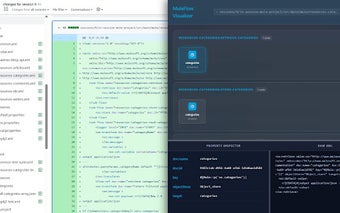
MuleFlow Visualizer for GitHub, created by the MuleFlow Visualizer community, converts MuleSoft XML into readable diagrams inside the browser to speed comprehension. The extension embeds a one-click Visualize action and renders interactive flows adjacent to code, exposing configuration details and change-awareness during review. It targets MuleSoft developers, integration engineers, and technical leads who review GitHub-hosted Mule projects and need faster understanding of integration logic without launching an IDE.
Designed to keep reviewers focused on repository context
The tool is built for code-review workflows where staying inside GitHub matters: it removes the need to open a separate IDE by providing a visual representation of integration logic alongside source files. That approach addresses reviewers who must grasp flow structure quickly, shortening the hand-off between reading XML and understanding architecture, and reducing the friction of switching tools during pull request reviews.
Renders locally to limit external processing
Visualization is produced in-browser, which preserves repository data on the client and avoids sending code to external servers for rendering. The extension supports both GitHub.com and private GitHub Enterprise instances, so teams that host code behind corporate boundaries can use the tool while keeping processing within the user's browser environment.
Optimized for modern Mule projects and Chromium browsers
The developer optimized the extension for Mule 4 XML structures, so teams using the current MuleSoft standard get the most accurate mappings from XML to flow diagrams. It runs on Chrome and other Chromium-based browsers, which sets a browser dependency that organisations must meet; projects relying on older Mule 3 constructs may see reduced fidelity and should validate diagram accuracy before relying on them for architecture decisions.
Community maintenance and practical adoption signals
The project is open-source and maintained by the community, so updates and bug fixes come through community contributions rather than a commercial roadmap. Integration architects and reviewers in the MuleSoft space report positive adoption for improving review throughput, suggesting the extension fills a collaborative gap between text-based diffs and visual reasoning during team reviews.
Practical add-on for reviewers who need visual clarity, with a compatibility caveat
For teams that host Mule projects on GitHub and use modern Mule XML, the extension provides a practical, in-browser way to inspect integration logic and accelerate review tasks. The community maintenance model supports ongoing refinements, but teams with legacy Mule structures or non-Chromium browser policies should verify compatibility before standardising the tool in their workflow.